
Attendance Point Report
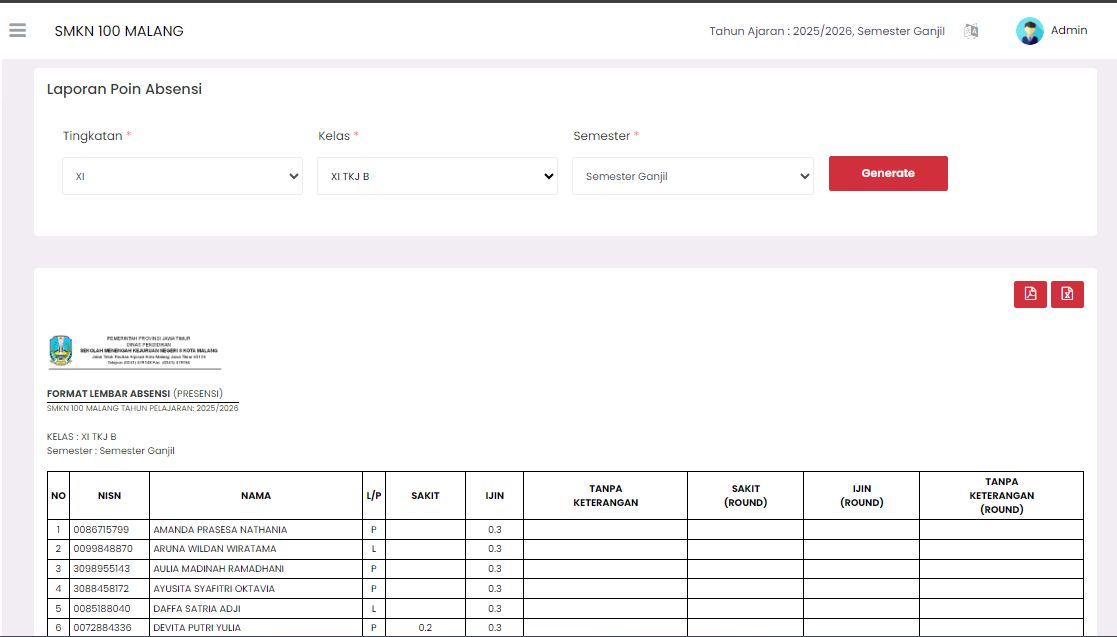
The Attendance Point Report page displays a recapitulation of student absence points in decimal units (hours) per semester, divided based on absence categories. This report functions as an audit tool and final semester data recapitulation.
Report Filter
To display the attendance point report, you must specify the following filters:
- Level: Select the student class level (for example, X, XI, or XII).
- Class: Select the specific class you want to review.
- Semester: Select the semester to be reported (for example, Odd or Even).
After selecting all criteria, click the red Generate button to load the report.
Letterhead (Report Header)
Each report page now features an official school letterhead at the top containing:
- School Logo — Automatically pulled from the school profile settings.
- Title "FORMAT LEMBAR ABSENSI (PRESENSI)" — Identifying the document type.
- School Name & School Year — Retrieved from active school details and the active school year.
- Class & Semester — Based on the filters selected during generation.
Attendance Sheet Format (Attendance Point Report)
This report table presents data in two formats: decimal points (actual) and rounding points (round).
| Main Column | Description |
|---|---|
| NO, NISN, NAME, M/F | Student identity data. |
| SICK | Total accumulated absence points due to illness (in decimal units, e.g., 0.3). |
| PERMISSION | Total accumulated absence points due to permission (in decimal units). |
| NO EXPLANATION | Total accumulated absence points without explanation (in decimal units). |
| SICK (ROUND) | Total accumulated sick absence after being rounded to the nearest unit (usually in units of days). |
| PERMISSION (ROUND) | Total accumulated permission absence after being rounded to the nearest unit. |
| NO EXPLANATION (ROUND) | Total accumulated absence without explanation after being rounded to the nearest unit. |
[!IMPORTANT] Attendance points are calculated based on lesson hours. For example, if 1 lesson hour is equivalent to
0.1point, then 3 hours of absence will be recorded as0.3points.
Official Signatures
At the bottom of each report page, there is an official signature block consisting of:
| Role | Details |
|---|---|
| Homeroom Teacher (Wali Kelas) | The name of the homeroom teacher and the NIP field. |
| Vice Principal of Student Affairs (Waka Kesiswaan) | The name of the Vice Principal, their digital signature (if configured in settings), and NIP. |
[!TIP] The digital signature for Waka Kesiswaan is fetched from the Attendance Settings module. Ensure this signature file has been uploaded to make it appear on printed reports.
Report Usage
This report is Read-Only. You cannot change attendance point data from this page. Changes to attendance data must be made through the Attendance Report page.
You can use the action buttons on the top right of the report to:
- Download PDF: Generate and download the full report with letterhead and signatures as a PDF file.
- Download Excel: Download the report data as an Excel spreadsheet (.xlsx) for administrative archiving or custom processing.
Need Further Help?
If you require further assistance, contact us through the eSchool Help page.